ZeRO now has an Android app: your in-game friends and whispers stay with you even when you are away from your computer. Everything about it, and the download button, is on the new App page, also linked in the site menu.
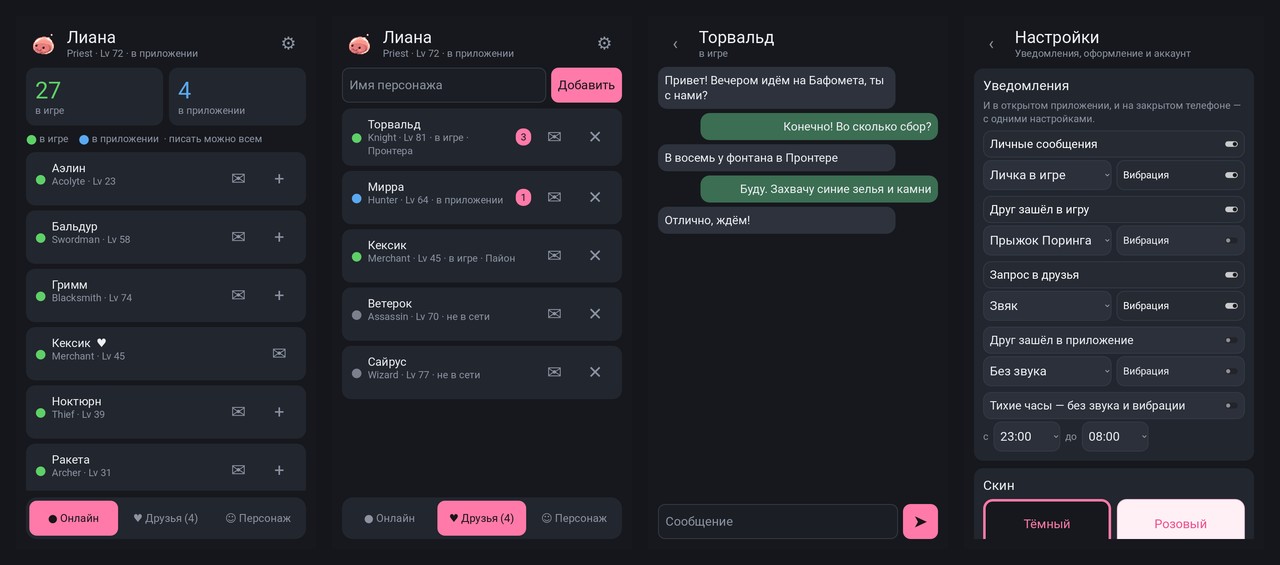
What the app does
- Who is online. How many players are in the game and in the app, the online list, and for your friends — who is in the game, who is on the phone and who is offline.
- Whispers. Chat with players just like in the game. If they are offline, they get your message when they log in.
- Notifications. A whisper, a friend logging in, a friend request — the notification arrives even when the app is closed. Sounds come from the game; vibration and quiet hours are adjustable.
- Same account. Log in with your login and password or with Google — the same account as in the game.
How to install
- Open zeroro.ru/en/app on your phone and tap "Download APK". At your computer? Point your phone's camera at the QR code on the same page.
- Open the downloaded file. The phone will ask whether the browser may install apps — allow it.
- Log in and pick a character.
Android 8 or newer is required. The app offers new versions by itself. There is no iPhone app yet.
Found a bug or have an idea for the app? Let us know — the app is just getting started, and your feedback will help make it better.